January 12, 2009
Introducing Do-it-Yourself Banners
Just upload your artwork to our server and save 10% too.
Just order the DIY Banner, make sure you select the proper square footage,
enter your options
:
Step 1: Choose the square footage of your final banner size.
Step 2: Select whether or not you would like grommets included in the banner.
Step 3: Enter the final dimensions of the banner in feet.
Step 4: Add any additional instructions, if necessary.
Step 5: Upload your artwork. (Illustrator, Pdf, eps, Photoshop jpeg, Quark)
Step 6: Add to Basket
We will examine your artwork to see if everything is OK and ready to go to print.
Vinyl Banner. Optional Grommets. Full color process and full bleed are no extra charge.
You can use any length or height combination as long as one of those dimensions
does not exceed 4 feet.

Upload your own logo to your General Admission Tickets and
get 10% OFF your total order.
This product will also earn you 10% off of your shopping cart total.
Ever want to add your logo to a ticket from our site?
Well now you can with our Logotik product.
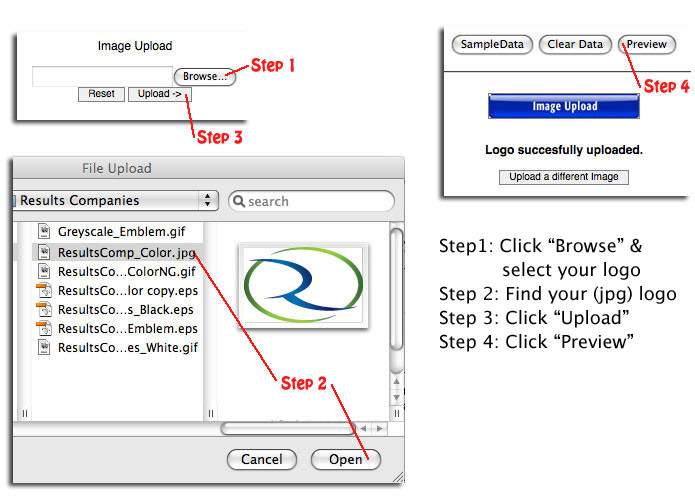
Uploading your logo is easy. Just follow these steps in the Logotik product page:
Design it online - general admission tickets, personalize wristbands, and posters.
Choose your color or background, enter your text, Proof online, purchase and ship to your door!
You can also find our line of off the shelf products to tie you over, if you are in a bind...
Worldwide Ticketcraft
Toll free: 877-426-5754
sales@wwticket.com
www.worldwideticketcraft.com |